Topology
The map of your code that Vibeless extracts from the repository, and how it differs from the spec map.
Last updated:
On this page
The Topology panel shows a map of your code: modules, routes, handlers, database tables, and the links between them. Vibeless builds it from the connected repository and keeps it current as files change, so you and your agents can see how the code is actually wired.
Where to find it
Topology is in the sidebar, after Logs. Press Ctrl+7 to open it. It shows the project you have open.
The topology needs a connected repository folder. A project with no repository connection has no topology.
How the topology differs from the spec map
Vibeless keeps 2 separate graphs for each project.
| Spec map | Topology | |
|---|---|---|
| Describes | What the project should be | What the code is now |
| Built by | People, in the Spec Editor (its Spec and Agent map tabs) and project import | Vibeless, from the source files |
| Updated | Only when a person changes it in the app | On every file change, new commit, and scheduled rescan |
| Editable | Yes, by people in the app (on a shared project, editors and maintainers) | No, by anyone |
The spec map is made of context nodes, the entries of guidance that agents read (see Agent map and Search). People curate it in the app, and nothing the file watcher finds is ever added to it. The topology is the opposite. Vibeless derives all of it, and nobody edits it by hand. Agents use the spec map to learn the intent and the topology to learn the current code.
How the topology is built
Vibeless reads the source files in the repository and runs a set of extractors over them. An extractor is a pattern matcher for one kind of link, such as an import statement or a route definition. No LLM is involved, and building the topology uses no credits.
Vibeless rebuilds the topology when:
- the file watcher sees a file change in the repository,
- the git monitor finds a new commit,
- a project import is applied,
- a scheduled repo rescan runs while the project is open (see Logs), or
- you select Rebuild.
Changes that arrive close together are combined into one run. Each run rebuilds the whole graph.
The walk skips node_modules, target, .git, and similar build and tool folders, agent working folders, and nested git repositories such as submodules. It does not apply your .gitignore, so generated or vendored source inside the project can appear.
Node kinds
| Label | Kind | What it is |
|---|---|---|
| Route | route | An HTTP route |
| Handler | handler | A Rust function that handles a route |
| IPC command | ipc_command | A Tauri command |
| Table | table | A database table |
| UI module | ui_module | A React file |
| Rust module | rust_module | A Rust file or use path |
| TS module | ts_module | A TypeScript or JavaScript file |
Python, Go, Kotlin, and Java files appear as python_module, go_module, kotlin_module, and java_module. The panel shows those kinds in gray, under a plain label such as "Python module".
Edge kinds
| Relation | Meaning |
|---|---|
imports | One module imports another from the same project |
calls | A UI file calls an HTTP route |
routes_to | A route is served by a handler |
invokes_ipc | A file invokes a Tauri command |
references_table | One table has a foreign key to another |
Import links are recorded only for code inside the project, and each one points at the file it imports. Standard library and third-party imports are skipped. Routes are shown by their full path, including the prefixes of the routers they are mounted in.
What you see
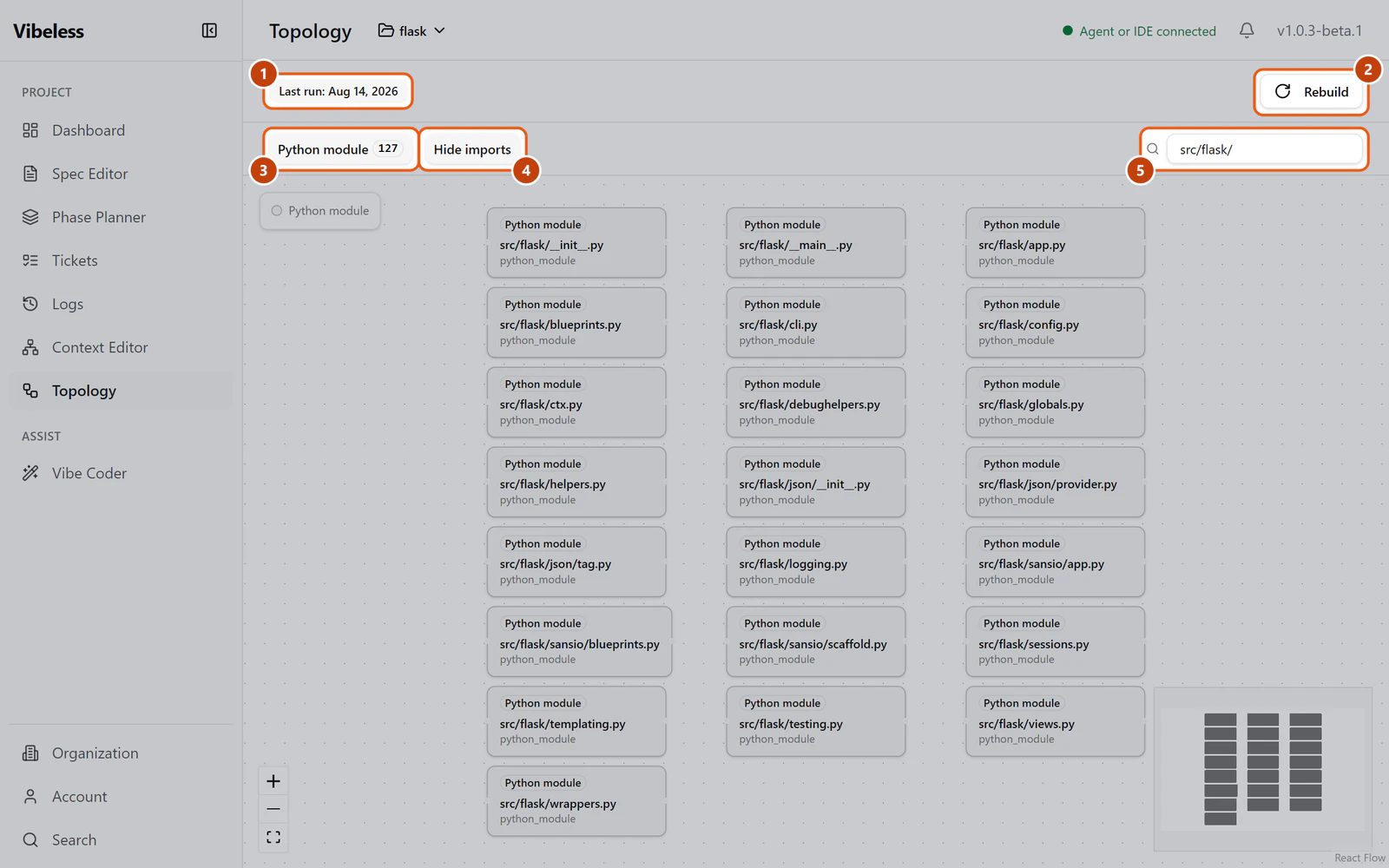
From top to bottom:
- Header. A Last run badge with how long ago the last build finished, a red badge with the extractor error count when the last run had errors, and the Rebuild button.
- Filter bar. One toggle button per node kind found in this project, each with a count. A Show imports / Hide imports button. A Search nodes… box on the right.
- Graph. Nodes laid out left to right, with an arrow for each link. Each node shows its kind label, a qualifier badge where one exists (such as the HTTP method on a route), its name, and a short description of its kind. A legend names the kinds on screen, and a minimap and zoom controls sit in the corners.
- Node details drawer. Opens on the right when you select a node.
 (opens full size in a new tab)
The panel updates on its own when a build finishes. You do not need to reload it. A live update keeps your zoom and the nodes you dragged.
The panel lays out at most 1,500 visible nodes at once. Above that, it says how many nodes match and asks you to search for a node or turn off a kind.
How to use it
Read the graph
- Open Topology. The graph opens with routes, handlers, IPC commands, tables, and UI modules shown. Module kinds start hidden, because import links usually outnumber everything else.
- Select a kind's button to show or hide it. Select Show imports to add Rust, TypeScript, and Python modules in one step.
- Type in Search nodes… to keep only nodes whose name contains the text.
- Drag nodes to untangle an area. Use the zoom controls in the corner, or scroll to zoom.
A link is drawn only when both of its ends are visible. If nothing matches, the graph says "No nodes match the current filters."
Inspect a node
Select a node to open Node details. The drawer shows:
- the kind label and qualifier,
- the full name,
- the source file and line where the extractor found it,
- the inbound links (what points to this node), with each relation, and
- the outbound links (what this node points to), with each relation.
Linked nodes are listed by their internal ID, not their name. Hover a listed link to see which extractor produced it. Select the close button to dismiss the drawer.
Rebuild
Select Rebuild to queue a fresh build. A message confirms the request, and the graph updates when the run finishes. Use it after you connect a repository, or when the Last run time looks old.
How it connects to the rest of Vibeless
Automatic context edges. After every topology build, Vibeless also re-checks the links between context nodes in the spec map. If code in one node's mapped files imports code in another node's mapped files, that counts as evidence for a depends_on edge between the two nodes. Those edges appear in the Agent map with an auto badge. The build never adds or changes a context node.
Pointers for agents. When an agent calls vibeless_declare_intent, Vibeless picks up to 5 context nodes that match the agent's description. It then adds topology nodes whose source files match those context nodes' file mappings. The agent gets a starting set of both guidance and code.
Governed code. vibeless_spec_neighbors lists the topology nodes and repository files that a context node's file mappings cover.
Agent tools. A connected agent can read the topology with 2 tools:
vibeless_topology_summarytakes no input. It returns node counts by kind, link counts by extractor, the 10 most-connected nodes, and details of the last build (when it started and finished, what triggered it, files processed, and nodes and links added or removed).vibeless_topology_queryhas 2 modes. Withneighbors_ofset to a node ID, it returns that node with its inbound and outbound neighbors, each named, with the link's relation. Neighbors are capped atlimitper direction (50 by default, at most 200) and paged withoffset. In this modekinds,name_contains,source_file_contains, andrelationnarrow the neighbors. Otherwise it filters the graph bykinds,name_contains, andsource_file_contains, combined with AND. At least one ofkinds,name_contains,source_file_contains, orneighbors_ofis required. Filter mode returns up to 50 nodes by default and at most 200 (set withlimit), plus the links between the returned nodes. The result says whether the list was cut short.
vibeless_get_node also accepts a topology node ID. It returns that node's details with at most 20 named neighbors in each direction, and suggests walking the rest with vibeless_topology_query.
Rules and limits
- The topology is read-only. Users and agents can view it, and users can trigger Rebuild, but nobody can add, edit, or delete its nodes or links.
- It shows only what the extractors recognize. Import links cover TypeScript and JavaScript, Rust, Python, Go, Kotlin, and Java. Route, handler, table, and IPC detection matches a narrow set of patterns: Rust route registrations of the form
.route("/path", get(handler))in files whose path contains/api/,routes, orhandlers, or inlib.rs,main.rs, andmod.rsfiles, Tauri commands, andCREATE TABLEstatements in Rust files whose path containsschemaormigration. UI-to-route calls are detected only in one fixed folder layout (App/vibeless/ui/src/, calling/api/v1/paths). Many projects show module nodes only. - It does not judge whether the code is correct or matches the spec. Comparing code with the spec is the job of drift checks, which look for code that departs from the spec.
- It does not follow your
.gitignore.
If something looks wrong
- "No topology yet." The project has not been built. Check that the project has a connected repository folder, then select Rebuild.
- The graph is empty but the filter bar shows counts. The kinds you have switched on have no nodes. Switch on more kinds, or select Show imports.
- A red extractor error badge appears. Some files could not be processed in the last run. The rest of the graph is still built. Select Rebuild after fixing or removing the files.
- The graph looks out of date. Check the Last run badge. Select Rebuild to force a fresh build.
- Files you expected to be excluded appear. The topology ignores
.gitignore. Only build folders, tool folders, and nested repositories are skipped.