Logs
Decisions, History, the Drift log, the repo scan, and Jev checks on paid plans.
Last updated:
On this page
The Logs panel holds the project's decisions, the history of every change to the project, and the ticket receipts waiting for your verdict. You use it to record decisions and judge drift. Agents read the same data through MCP.
Where to find it
Open Logs from the sidebar (item 5) or press Ctrl+5. The panel has 3 tabs, on every project:
| Tab | Shows |
|---|---|
| Decisions | The decision log |
| History | Every change to the project, newest first, and every full repo scan |
| Drift log | Receipts for tickets that reached Review or Done, waiting for your verdict |
When tickets have receipts waiting for your verdict, a badge appears next to Logs in the sidebar. It shows the count from 1 to 9, then "9+", and a dot above 99. A collapsed sidebar shows a dot instead. The badge is part of the Logs item, not a separate button. Logs always opens on the Decisions tab; switch to Drift log to see the waiting receipts.
Decisions
A decision is a recorded choice about the project, with the reasoning behind it. Each decision record holds:
- Decision: what was decided.
- Rationale: why.
- Alternatives considered: what else was weighed (optional).
- Made by: a person or an agent, shown as a badge.
- Forbids: an optional list of dependencies this decision rules out.
 (opens full size in a new tab)
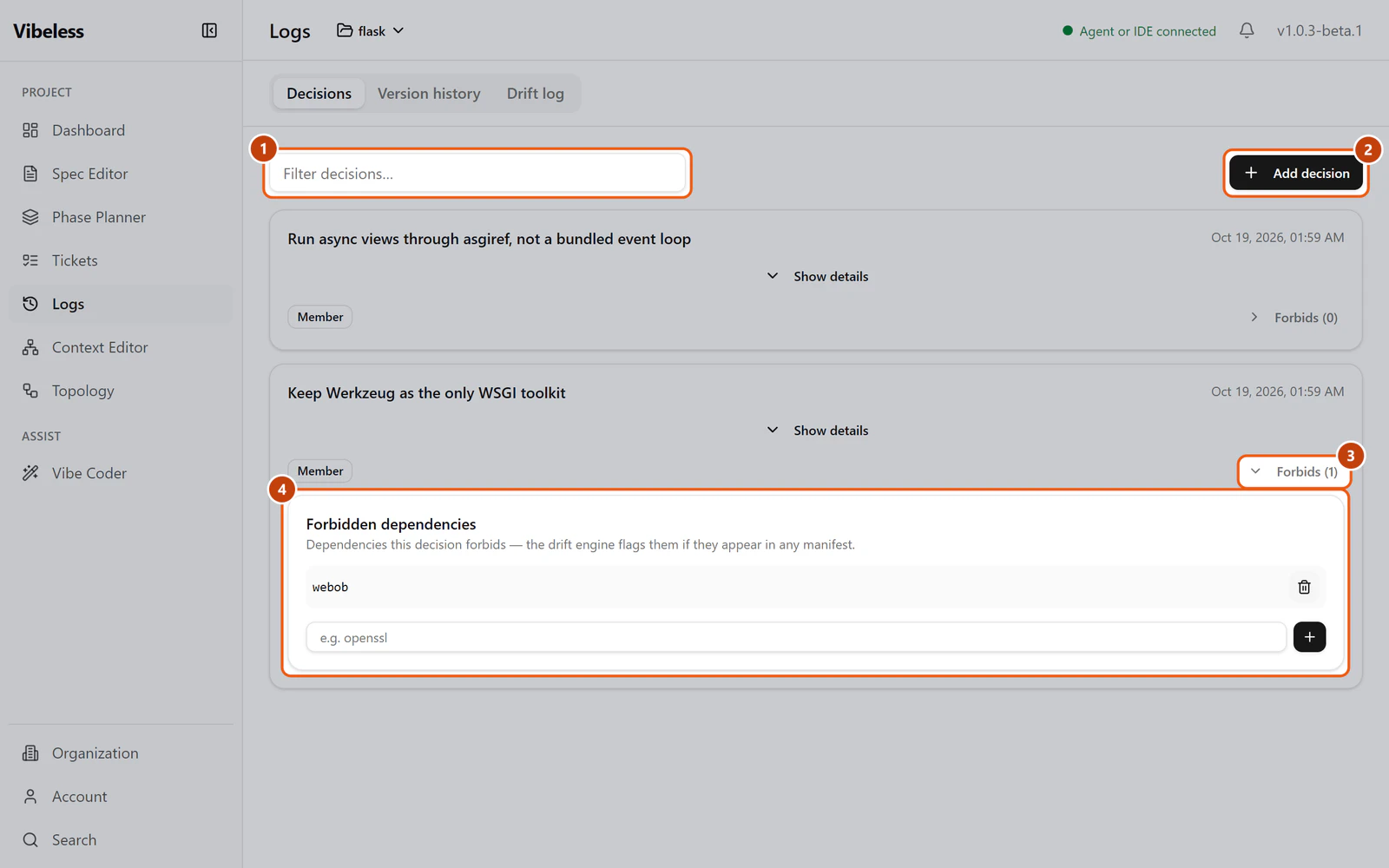
Each card shows the decision and its date. Select Show details to read the rationale and alternatives.
The filter box above the list matches text in the decision, the rationale, and the agent name.
Add a decision
- Open Logs, then Decisions.
- Click Add decision. The Log decision sheet opens.
- Fill in Decision and Rationale. Alternatives considered is optional.
- Made by defaults to
user. Agent name is optional. - Click Log decision.
Vibeless does not save a decision with an empty Decision field.
Edit forbids
The decision text has no edit control in this tab. The forbids list does.
- On the decision card, click Forbids (N), where N is the current count.
- The Forbidden dependencies editor opens under the card.
- Type a dependency name (for example
openssl) and click the add button. - To remove one, click the trash icon beside it.
Each add or remove saves at once.
What forbids do
Forbids make a decision checkable. The decision detector in the drift check looks for each forbidden name in the project's dependency manifests and reports every match as a finding. A decision with no forbids is skipped as "not machine-enforceable", and the agent has to apply it by judgment.
Decisions and agents
A connected agent works with decisions through 3 MCP tools:
vibeless_log_decisionrecords a decision with its rationale and alternatives, and optionally a ticket. The record is marked as made by an agent. The tool also returns a list of earlier decisions that share keywords with the new one, so the agent can check for overlap.vibeless_list_decisionsreturns the decision log, newest first. By default it returns short summaries (20 per page, at most 100), including whether each decision has forbids. Withfull: trueit returns complete records, forbids included.vibeless_check_constraintreturns up to 3 decisions most relevant to an action the agent proposes, ranked against each decision's text, rationale, and forbids.
The SessionStart digest (the project summary an agent receives when a session starts) has a Key Decisions (binding) section. Decisions with forbids come first, then the rest by recency.
Agents never write forbids: vibeless_log_decision has no forbids field, and no MCP tool edits an existing decision. On a shared project, only a maintainer can change forbids. When an editor tries, the app refuses the change and tells them to ask a maintainer.
History
History is the record of every change to the current project: its spec, tickets, phases, decisions and context. Vibeless records each change as an event with the old value, the new value, and who made it. The Spec Editor's Spec and Architecture tabs save edits on their own, and each of those saves is listed here like any other (see Spec Editor). Version history is kept in a local database on your computer. On a shared project, changes that arrive from teammates through sync are recorded there as events too.
What you see
- Header. "Repo last scanned …" (or "Repo not scanned yet") and the Check now button, which runs a full repo scan (see The drift check below).
- Rows, newest first, grouped under Today, Yesterday, and earlier dates. Each row shows who made the change, one plain sentence describing it (for example, "moved Add login to Review"), and how long ago it happened. A row whose change has a diff also has a chevron. Hover the time to see the exact date.
- Load older, at the bottom, when there is more history.
On a solo project, the person column shows You, Agent, or Vibeless.
View a diff
Click the chevron on a row to expand it. A side-by-side diff shows the old value against the new one. The diff follows the app theme, light or dark. Rows with neither value have no chevron.
Scan rows
Each full repo scan is a row in the same list. The person column shows who started it: You, Agent, Scheduled, or Vibeless. A badge shows the highest severity found (High, Medium, or Low), or No drift. The sentence reads "Full repo scan: N findings", or "Full repo scan: no drift found". Click the chevron to list each finding with its severity and a summary. Scans are not tied to a person, so the member filter hides them unless it is set to All members.
Shared team projects
When the project is shared with your organization and your organization is on a team plan, History adds names. Its purpose line reads: "Every change synced to this project, in plain language, tagged to whoever made it."
The person column shows:
- You for your own changes.
- A member's name for their changes.
- The member's name followed by "(agent)" when an agent made the change on that member's behalf.
Changes that match no current member, such as changes made before the project was shared, appear in a separate Before sharing group.
Use the member filter at the top right. Choose All members, one member, or Unattributed (changes that match no current member, including pre-sharing changes).
The verified shield
On a shared project, some events show a small shield after the author. Hovering over it shows: "Signed by the author's device and verified on this computer." The shield appears only on changes that arrived from another device and passed signature verification. Changes made on your own computer never show it.
Rollback and agents
The History tab has no rollback control. It is a read-only record, and viewing events or diffs never changes the project.
vibeless_get_version_history is the agent's read-only view. The agent passes an entity type (such as project, phase, or task), the entity's ID, and an optional limit, and gets back each event's field, old and new values, and actor.
Drift log
The Drift log lists the tickets whose work may have left the ticket. You answer each one inside the ticket, on its Reports tab. Drift is a gap between what the project record says and what the code does. The tab shows one list, Needs verdict (N): the receipts waiting for your verdict, grouped by phase. Below it sit a collapsed No evidence recorded (N) group and, on a paid plan, Show quiet receipts. Nothing in this tab ever adds to the spec map that agents read: the map is maintained by people in the app.
Full repo scans and Check now are on the History tab. Coverage, receipt counts, detector health and the weekly digest are on the Drift detector card (see below).
What a receipt is
A receipt is Vibeless's own report on one ticket. It answers one question: did the work bound to this ticket stay inside it, and if it left, has a person looked? Vibeless builds it without an LLM, from 3 kinds of record (on a paid plan, Jev then checks the finished receipt, see Jev checks below):
- Recorder hooks. The recorder hooks that the agent installer writes (a plugin, for OpenCode) post each file the agent writes, each shell command it runs, and the end of each turn to the app. Every agent except Cursor also records each prompt. For GitHub Copilot, Antigravity, and Gemini CLI, recording from a live session is not yet verified. Each write is recorded with the ticket the agent's session was bound to at that moment. See Connecting agents.
- Change events. A file watcher reports file changes as they happen, and a git monitor reads each new commit with its message and stats. The
Vibeless-Ticket:trailer on a commit decides which ticket the commit belongs to, and the recorded write says which session wrote the file. If the two name different tickets, the receipt keeps the trailer's ticket and adds the fact "trailer contradicts provenance"; nothing is moved for you. A commit with no trailer is attributed to a ticket its message names only when the ticket number starts the subject line or sits alone in parentheses, the ticket is not Done, and fewer than 9 in 10 of the project's recent commits carry a trailer. Otherwise the receipt only notes that the message cites the ticket. - Intent. An agent binds its session to a ticket when it pins the ticket with
vibeless_set_active_ticket, moves it to In progress withvibeless_update_task_status, or names the ticket invibeless_declare_intent, passing its session id. Work from a bound session is attributed to that ticket. The project's active ticket never attributes work on its own, so git checkouts, merges, rebases, edits by people, and writes from an unbound session are not charged to the ticket you have pinned.
Paths on the project's agent-artifact ignore list, and paths your repository's .gitignore excludes, are never recorded. You manage the ignore list in the Agent-artifact paths card on the Dashboard's Agents tab. Recording follows the project that is open in the app: changes made while a different project is open are not recorded.
When a ticket moves to Review or Done, Vibeless builds a receipt on the computer where the move happened. The receipt lists:
- Touched: every file the ticket's work changed. A file that a shell command only named is not counted.
- Explained: touched files the ticket accounts for. A file is explained when the ticket's spec, acceptance criteria, or a human comment names it, when it is the test for a touched file, when it is a wiring hub such as a module index, or when it sits in a directory the ticket already claims. The agent's attestation never explains a file on its own: a file that only the attestation lists stays unexplained and Jev judges it. If the attestation says the agent changed a file outside the ticket, that file is unexplained too, and Jev sees its diff.
- Unexplained: the rest. These are what you look at.
- Facts: structural observations about the change, each with the paths that show it.
- Detector hits: constraint, non-goal, phase boundary, and decision-forbid findings, run over the touched files only.
The receipt sorts the files in its window into 4 sections: written for this ticket, generated by git, written by other sessions or tickets, and could not be verified. Only the first section is judged, and only that section is sent to Jev. A receipt with nothing attributable to judge is not sent and uses no credits.
From these, Vibeless proposes one of 3 readings:
| Proposal | Meaning |
|---|---|
| clean | At least one file touched, every file explained, no facts, no detector hits, no file explained only by the agent's word, and the repository was readable. Nothing to do. |
| review | Anything else. Shown as a Review badge. |
| unattributed | No session, change, commit, or attestation could be tied to the ticket. Shown as an Unattributed badge. |
A clean receipt needs no verdict. On the free plan, the other 2 wait for yours. A receipt with no evidence at all is the exception: it is listed apart under No evidence recorded, with a Dismiss button that is not a verdict. On a paid plan, Jev's check decides which receipts wait (see Jev checks below).
Receipts are versions. Rebuilding a ticket's receipt when nothing changed writes nothing. When the evidence changed, a new version is added and the old one's version line ends "· superseded" and it moves under Earlier versions. Only the newest version takes answers. The Definitions section of each receipt starts with a Sources line, such as "sessions 1; hook touches 12; change events 9; commits 2; attestation yes", so you can see how much Vibeless had to go on.
Needs verdict
The list shows, per ticket, the newest receipt that still needs a verdict, newest first, grouped under each phase in Phase Planner order. Receipts whose ticket or phase cannot be found sit under Other. Each row names the ticket, counts its unexplained files and facts, shows a badge, and gives the build time. The badge is Scope drift detected or Risk action outside the ticket for an alert, and otherwise the proposal (Review or Unattributed). Select a row to open the ticket on its Reports tab, where the receipt card and its flagged files are.
On a paid plan, the rows are the receipts Jev flagged, the risk alerts, and receipts that could not be checked and still follow the free-plan rule, not every receipt marked Review (see Jev checks below). The sidebar badge on Logs counts these rows. On the Tickets board, the ticket's card shows a red or orange drift chip, and the board's Needs attention filter keeps only those tickets (see Tickets).
Risk actions
On every plan, Vibeless watches the commands an agent runs for a ticket. A production deploy, a package publish, a force push, a dropped table, or a recursive delete of an absolute or home-relative path that the ticket does not ask for raises Risk action outside the ticket right away. So does an agent deleting test files. The receipt waits for your answer, and a risk action recorded after you gave one asks again. With OS notifications on, a system notification appears too. This alert is detected on your computer and uses no LLM and no credits.
Vibeless reads the command the agent ran, not what the agent said or what a tool printed. Those texts are noted on the receipt but never raise this alert. A command is left quiet only when Vibeless can show it is harmless: the risky words sit inside a quoted message or a commit text, the command only reads or searches, a migration points at a local database address written in the command, or a delete stays inside a project worktree. A command Vibeless cannot fully read, such as one built with a substitution, still alerts. A dropped database or table always alerts. So does prisma migrate deploy, even when the command names only a local database, because the command text cannot show which database Prisma reaches. You clear that alert yourself.
A risk command in a session that has no ticket raises one notification titled "Vibeless: risk action in a session with no ticket" for each distinct command. It creates no receipt. These notifications stop at 3 per project in 24 hours, followed by one summary notice.
Two more notifications arrive while the agent is still working, with no receipt and no credits: "Vibeless: test deleted by the agent" and "Vibeless: test weakened by the agent". The second appears when a test file gains skip markers or loses most of its assertions. Each fires once for a given file and content.
To approve one command, tell the agent to run it, naming the exact command in backticks, for example: run wrangler deploy. The approval covers one run of that one command in that session. It ends at your next message, after the command runs once, or when the agent's turn ends. A later run of the same command alerts again. A question, a "don't", a different environment or any other wording does not count. On a paid plan, an approved command goes to the digest as "You approved: <command>" instead of alerting.
In Claude Code, such a command also asks for your approval before it runs, in the default, accept-edits and auto permission modes. Only git push --dry-run, npm publish --dry-run and wrangler deploy --dry-run, typed as the command itself, skip the approval prompt. Vibeless adds no such prompt under any other agent; the risk alert still fires.
Jev checks
On a paid plan, Vibeless sends each new receipt to Jev, an LLM judge that reads the ticket and the receipt and answers 3 questions: did the work stay on plan, which unexplained files fall outside the ticket, and which acceptance criteria the commits show as met. Jev's answer, weighed against what your verdicts have taught the detector for this project, decides whether the ticket needs your attention now. The receipt is built exactly as before and remains the evidence you read.
A checked receipt either alerts or stays quiet:
- Scope drift detected. Jev judged the work off plan strongly enough to alert. A strong off-plan judgment alerts on its own, provided Jev flagged at least one file. The ticket card's drift chip turns red, the receipt joins Needs verdict, and the Logs badge counts it. The system notification appears once for the files it names. A later version of the same ticket stays quiet unless it flags a file that was not named before or that you have not answered, and the notification names the new file.
- Checked, nothing to review. Jev judged the work on plan. The card's chip is green, and there is no list row and no badge. The receipt stays on the ticket's Reports tab with Jev's answer.
- Checked, not enough evidence to alert. Jev leaned off plan, but not enough to interrupt you. The receipt goes to the weekly digest on the Drift detector card.
- Looked off plan, but no file was flagged. Jev judged the work off plan but did not flag any file with a probability of 0.5 or more, so there is nothing to point at. The receipt goes to the weekly digest.
- A risky command ran after your prompt asked for it. A risk command matched your approval of that exact command. The receipt goes to the digest, with "You approved: <command>".
- The agent declared this change; it raised the score but does not alert on its own. The agent's own report named a file as changed outside the ticket. The receipt goes to the digest.
- The agent declared a change to a risky file the ticket does not mention. The agent named a config, CI, migration, lockfile or manifest file as changed outside the ticket. The digest lists it, and it never interrupts you on its own.
- The same content was committed under another ticket. A file's content also appears in a commit under a sibling ticket's trailer. The digest row and the ticket's Reports tab each have a Move and a Keep button. Nothing moves until you choose Move.
- Checked, some odds of drift in risky files; a second review is not available yet. Jev leaned off plan on files such as config, CI, a migration, a lockfile or a deleted test. The receipt waits, because Vibeless cannot yet ask for a second opinion.
- Checked: the spec may be out of date. Jev judged that the ticket's text no longer matches the work. The headline reads On target · spec may be out of date, and the receipt goes to the weekly digest. It does not alert or notify. The action to take is to amend the ticket, not to review the work.
The Jev check block, under Show full receipt on the receipt card, shows Jev's verdict and confidence, the flagged files with the probability that each lies outside the ticket (files at or above the file threshold, 0.5), the criteria Jev confirmed as met (only criteria that name a file whose change Jev saw), the number of files withheld from the request, the model, and the credits the check used. Criteria appear as confirmations only. A criterion missing from the list is not marked as unmet.
On a paid plan a quiet receipt does not wait for you, even when the deterministic proposal is Review. To see the quiet receipts, select Show quiet receipts under the list on the Drift log tab. Your answers end the alert, and Jev's answer on that receipt is then information only. The exceptions are a risk action recorded after your answer, and a ticket that comes back after Send back to undo. The free plan keeps the rule described above.
When a receipt cannot be checked, the block reads "Not checked" and the receipt follows the free-plan rule. The reason is one of these:
- Jev checks are part of paid plans. You are on the free plan.
- Check queued. The app was offline or signed out. It sends the check on a later attempt.
- Nothing to judge: the ticket accounts for every file. There was nothing outside the ticket for Jev to look at.
- A newer version replaced this one before it was checked. Only the newest version is checked.
- Out of credits. The plan's credits for the period are used up.
- The check failed (<code>). The service refused or failed the check, and the block names the code.
- No reason. The receipt was built before checks existed or on another computer. Jev checks only the receipts built on the computer that moved the ticket, and the result stays on that computer.
The Reports settings keep one choice for each project, OS notifications; how Jev weighs the evidence and when it alerts is set by Vibeless. Jev sees up to 60 lines of the change for each unexplained file, which makes its answers more accurate. Besides the diffs, a check sends the ticket's name, spec, acceptance criteria and constraints, the commit messages, and the paths of the files written for the ticket. Your prompts are not sent. Files that look like secrets, such as .env, are never sent. The card shows how many were withheld, and secrets found in the text or diffs are redacted first.
With OS notifications on (the default), an alert shows one system notification per receipt version, titled "Vibeless: scope drift detected" or "Vibeless: risk action outside the ticket", with the ticket's name. A receipt Jev finds out of date never notifies, and neither does a receipt that already has a verdict, unless a new risk action is recorded after it.
Checks cost about 0.027 credits per ticket and use your plan's credits. 50 tickets a month use about 1.4 credits. On a team plan they draw on the organization's pool.
Answer the flagged files
Flags are answered inside the ticket. Nothing opens on its own: the chip on the board card, the Needs attention filter on the board, the Drift log, and the system notification tell you a ticket has flags.
- Open the receipt card on the ticket's Reports tab. The Scope row and the full receipt's Unexplained files list have a copy button beside each path.
- Under "What should happen to these files?", read each group of flagged files.
- Select one of the 3 answers for each group.
- Keep it. The change is fine, and the flag is cleared.
- Move to another ticket…. The work belongs to a different ticket. Pick an existing ticket or create a new one, and the files move there.
- Send back to undo. The ticket returns to In progress with a comment that names the files for the agent. Vibeless never reverts files itself.
Keep everything answers every waiting group at once. A receipt that waits with no group of flagged files, for example after a risky command or on the free plan, offers Keep everything and, where there is something to name, Send back to undo. A receipt with no evidence shows Dismiss instead.
Your answers add up to the receipt's verdict, which the headline badge and the Receipts counts on the Drift detector card show. Any Send back to undo or move to a new ticket counts as off plan. Otherwise any Keep it counts as on plan. If every group moved to an existing ticket, the verdict is not this ticket's work.
When a newer version of the receipt differs only by the agent's attestation, the verdict is carried forward to it, and the headline badge's hint says so.
Tickets describes each action in full.
Build receipt at the top of the Reports tab builds a fresh receipt for a ticket that is In progress, in Review, or Done. Use it after new commits, or on a computer that did not make the status change. If nothing changed, the app reports "No changes since the last receipt".
Receipts and teammates
Receipts, answers, sessions, and intents stay on the computer that recorded them. The rendered report syncs to a shared project. So do the ticket changes an answer makes: the return to In progress and the comment from Send back to undo, and a ticket created by a move. On another device, the synced report appears on the Reports tab as an ordinary report with no actions. Select Build receipt there to review the ticket from that device's own records.
The Drift detector card
Open Dashboard, then the Agents tab, to find the Drift detector card. It shows how drift detection is doing on this computer, and it is not shared with your team.
- Enforceable counts the constraints, non-goals, and decisions that carry a machine-readable field the detectors can use, as enforceable out of total per kind. You raise the numbers by hand: forbids on the Decisions tab, path globs in the Phase Planner.
- Receipts counts receipts built, receipts awaiting a verdict, and the verdicts of the last 30 days split into on plan, off plan, fix spec, and not this ticket's work. A carried verdict is not counted as a verdict.
- On a paid plan, the card also shows the detector's health line, with its alerts this week, and This week's digest. The digest also lists proposed moves of a file to another ticket, each with Move and Keep. Some digest rows ask whether the item was drift, with Yes and No buttons: Yes records an off plan verdict on that receipt, and No records on plan. When the detector has stopped learning from your answers, the health line shows a "calibration frozen" badge with the reason, and Reset calibration starts it again.
The staleness warning
The spec map only changes when a person edits it in the app, so it can fall behind the code. The project context, vibeless_declare_intent, and the SessionStart digest warn the agent that the map may be stale when either of these is true:
- The map has not been edited in 7 or more days.
- The map is empty.
The warning tells the agent to treat suggested starting points as hints. It changes nothing in the map, and clears once the map has been edited within the last 7 days.
The drift check
The drift check is a rule-based scan of the repository. It uses no LLM and no credits. It runs in 3 ways:
- You select Check now at the top of the History tab.
- The project's schedule runs it. Set the schedule in Dashboard → Settings → Repository → Repo rescan: Manual, Daily, Weekly (the default), or Monthly. Scheduled scans run in the background while the app is open, one project at a time, and the card shows when the next one is due. Agents cannot change the schedule.
- An agent runs it with
vibeless_run_drift_check. Each run re-checks the repo, so agents should not call it in a loop.
Each scan appears as a row in History. A ticket receipt runs the same detectors over the files the ticket's work touched.
The check runs 5 detectors. A detector counts as applicable only when the spec gives it something to enforce:
| Detector | Checks | Applicable when |
|---|---|---|
tech_stack | Pinned dependency versions in the tech stack against the manifest they came from | At least one pinned version, and at least one manifest found in the repo |
constraint | Source files for matches of each constraint's pattern | At least one constraint has an enforceable pattern |
scope | Changed files against the path globs of each non-goal | At least one non-goal has path globs, and a drift baseline exists |
phase_boundary | Changed files that fall outside the path globs of the lowest-numbered active phase | A phase is active, that phase has path globs, and a drift baseline exists |
decision | Manifests for dependencies a decision forbids | At least one decision has forbids, and at least one manifest found |
The drift baseline is a record of the repo's files, captured when a project import is applied. The scope and phase checks only look at files changed since then. Agents cannot reset the baseline.
The tool's reply starts with a header line, then one skipped: line per detector that did not apply, then the full report. The header is one of:
N finding(s) from M applicable detector(s).The check found problems.No drift found by N applicable detector(s).The applicable detectors ran and found nothing.No detectors applicable, followed by a list of what to add (phase path globs, constraint patterns, non-goal path globs, decision forbids, or pinned tech-stack versions). Nothing was enforceable, so an empty report proves nothing.
Each skipped: line names the detector and its reason, such as "no decision carries forbids" or "no drift baseline set". To make more detectors apply, a person adds the missing piece in the app (on a shared project, a maintainer). Agents never write constraints, non-goals, forbids, or path globs.
Rules and limits
- On a shared project, only a maintainer can change forbids. Agents never write forbids, constraints, non-goals, or path globs.
- Building a receipt, running the drift check, and raising a risk-action alert use no LLM and no credits, on every plan. On a paid plan, Jev, an LLM judge, checks receipts, and a check costs about 0.027 credits.
- A receipt is built only on the computer that moved the ticket to Review or Done, or where you select Build receipt. Only the newest version takes answers.
- Answers to flagged files stay on this computer. Vibeless never reverts files itself.
- Nothing in the Drift log adds to the spec map.
If something looks wrong
- History shows no names. The project is not shared, or your organization is not on a team plan.
- A receipt says Unattributed although the agent did the work. Vibeless found no session, change, or commit tied to the ticket. Check that the agent pinned the ticket or declared intent with its id and its session id, that the recorders are installed (Reinstall on the Dashboard's Agents tab), and that commits cite the ticket. Then select Build receipt.
- A receipt's Sources line reads "hook touches 0". The recorder hooks are missing from the agent's configuration, usually because the app could not rewrite the file when it started. Select Reinstall on the agent's row, then Build receipt.
- A ticket moved to Review but no receipt appeared. The move was made on another device. Select Build receipt on this one.
- A receipt you expected is not under Needs verdict. On a paid plan, Jev may have left it quiet. Select Show quiet receipts, or open the ticket's Reports tab.
- Receipts list files you expected to be explained. A file counts as explained when the ticket's spec, acceptance criteria, or a comment names it. Name the files or folders the ticket covers, or turn on the attestation request so agents list what they touched.
- The coverage and receipt counts are gone from the Drift log. They moved to the Drift detector card on the Dashboard's Agents tab.
- A decision is ignored by the drift check. It has no forbids, or the repo has no manifest the check can read. Add forbids in the Decisions tab.
- The drift check says no detectors are applicable. The spec has nothing enforceable yet. Read the
skipped:lines to see what each detector is missing. - Agents keep reporting a stale spec map. Update the map in the app.