Connecting agents
Installing the MCP connection and hooks for your coding agent, plus reports, agent-artifact paths, and troubleshooting.
Last updated:
On this page
Connecting an agent gives your AI coding tool live access to the project's specs, decisions, constraints, and tickets through MCP (the Model Context Protocol). You set it up once per project, and Vibeless keeps the agent's configuration current after that.
Where to find it
Open the project, select Dashboard in the sidebar, then the Agents tab. The tab has 5 cards, top to bottom: Connected agents, Hooks, Reports, Drift detector, and Agent-artifact paths. The Drift detector card is covered in Logs.
The setup wizard opens once, right after you create a project. It has 3 steps: Select agent (Claude Code, Codex, Cursor, OpenCode, Antigravity, GitHub Copilot, or Gemini CLI), Confirm, and Install. Its last step runs the same install. If you skip it there, you can install later from this tab.
For the list of tools an agent can call once connected, see MCP tools reference.
How the connection works
- The local server. When the app starts, it runs the bundled
vibeless-mcp-serveras one local MCP server on a fixed loopback port (127.0.0.1). The port stays the same across restarts. If another program takes it, the app picks a new one and rewrites every installed agent's configuration. - The manifest. The app writes
~/.vibeless/manifest.json. It lists the app's internal bridge port and every project with its token. The MCP server reads it on every request to work out which project the request belongs to. - The project token. Each project has its own token, a random 64-character string. The installer writes it into the agent's configuration file as an
Authorization: Bearerheader. It tells Vibeless which project the agent works on, so an agent never sees another project's data. - Hooks. A hook is a command the agent runs at a set moment, such as the start of a session. For Claude Code, Vibeless installs 5 by default. One injects a project digest when a session starts. One injects a short reminder each time you send a prompt, and records the prompt. 2 recorders post the file each tool call edits, and the end of each turn, to the app. A gate asks for your approval before a risky shell command runs. Codex gets the same hooks without the gate. The other agents are covered under Supported agents. The recorders print nothing and never block the agent. Their records feed ticket receipts (see Logs).
Supported agents
Each supported agent installs from Connected agents with one click. The table lists them; Gemini CLI is experimental. There is no manual or copy-paste setup for other agents.
| Agent | Setup | Hooks |
|---|---|---|
| Claude Code | Automated from Connected agents | Native hooks, including the risky-command gate |
| Codex | Automated from Connected agents | Native hooks |
| Cursor | Automated from Connected agents | Recorder hooks; a rules file for context |
| OpenCode | Automated from Connected agents | Plugin recorders; an instructions file for context |
| GitHub Copilot | Automated from Connected agents | Native hooks for the digest and recording; a block in its instructions file for the reminder; no risky-command gate |
| Antigravity | Automated from Connected agents | Native hooks for the digest and recording; a rules file for the reminder; no risky-command gate |
| Gemini CLI (experimental) | Automated from Connected agents | Native hooks for context and recording; no risky-command gate |
Cursor has no hook that injects context. Vibeless writes a rules file, .cursor/rules/vibeless.md, that tells the agent which Vibeless tools to call at the moments a context hook would fire on Claude Code. Following those rules is up to the agent, so this is less reliable than real hooks. The same limit is stated in the rules file itself. Cursor does have hooks that fire after a file edit, after a shell command, and at the end of a turn, and Vibeless installs its 2 recorders there, in .cursor/hooks.json.
OpenCode has no hook that runs a command. Vibeless gives it the project digest through an instructions file, .vibeless/hooks/opencode-session-start.md, which OpenCode loads when a session starts. A plugin, .opencode/plugins/vibeless.ts, adds the per-prompt reminder to every request the agent sends to its model. The same plugin records prompts, edits, shell commands and the end of each turn. Hooks you write on the Hooks card cannot be installed into OpenCode, so it has no tab in the hook install dialog, and OpenCode has no risky-command gate. OpenCode 1.19.4 or any 2.x is required; a project that has an .opencode/opencode.jsonc file is refused, because Vibeless writes only opencode.json and OpenCode would load both.
GitHub Copilot reads the same .mcp.json file as Claude Code. Vibeless keeps one vibeless entry there for both agents and lists the agents that use it. The digest reader and the recorders go into .github/hooks/vibeless.json. The per-prompt reminder is a marked block in .github/copilot-instructions.md, because Copilot discards what a prompt hook prints.
Recording from a live Copilot session is not yet verified. The table lists what was checked, and anything not run is listed as not verified.
| Copilot surface | Windows | macOS |
|---|---|---|
| Copilot CLI | Checked on versions 1.0.111 and 1.0.112 with test hooks: the hook events fire, the CLI connects to a test MCP server listed in .mcp.json, and a test hook's session-start context and a test instructions file reach the model. Copilot CLI also started a copy of the recorder commands from an earlier build, with a placeholder project id. The Vibeless server and the digest reader have not been run in a live Copilot session, and recording into the app is not yet verified. | Not verified |
| Agent sessions in VS Code | Not verified | Not verified |
| Copilot cloud agent | Not recorded. These sessions run on GitHub. | Not recorded |
| Copilot in JetBrains IDEs and Visual Studio | Not covered | Not covered |
- Trust the folder. In a folder that is not trusted, Copilot CLI skips the project's hooks and MCP servers. It still loads the instructions file, so the reminder arrives while the Vibeless tools do not. Trust the folder in Copilot, then start a new session.
- The project must be the repository root. Copilot CLI loads hooks from the root of the git repository, so in a project that is a folder inside a repository the recorders would never run. Vibeless refuses to install GitHub Copilot there and writes nothing. Open the repository root as a Vibeless project and install GitHub Copilot in that project.
- Node. The hooks are
nodecommands, so Node must be on yourPATH. - The MCP file holds a token. After install,
.mcp.jsonholds the project token, so Vibeless adds it to.gitignoreand refuses to install while git tracks it. Rungit rm --cached .mcp.json, commit, then select Install again. - A
vibelessserver you wrote yourself. Install overwrites avibelessentry you wrote in.mcp.json, and uninstall removes it. Antigravity and Gemini CLI refuse to install over such an entry in their own files. - A file committed after an install. The token is in git history. Select Rotate token after untracking the file.
- A tracked file that needs a change. If git tracks
.mcp.jsonand its entry needs a new port or token, Vibeless writes nothing into it. This also applies when the app starts. The row shows an issue until you untrack the file and select Retry. - Other refusals. Vibeless does not edit a
.mcp.jsonthat is not valid JSON. Fix the file, then install again. - The hooks file.
.github/hooks/vibeless.jsonbelongs to Vibeless, and Vibeless adds it to.gitignore. Put your own Copilot hooks in another file in.github/hooks. - A hooks file of your own. If a file of that name is yours, or you added something to it, Vibeless connects the tools and leaves the file alone. The row then shows an issue with the reason.
- The instructions file.
.github/copilot-instructions.mdis yours and holds no token, so Vibeless does not add it to.gitignore. Vibeless changes only its own block, between<!-- vibeless:start -->and<!-- vibeless:end -->. - Committing the instructions file. A teammate without Vibeless gets the block too, and it tells their agent to call Vibeless tools it does not have. GitHub documents that the Copilot cloud agent reads the committed file as well.
- With Claude Code in the same project. Copilot CLI also runs Claude Code's hooks from
.claude/settings.json. Vibeless keeps those hooks silent in a Copilot session and stores each event once. - A new session after install. Start a new Copilot session after you install. A session is treated as Copilot's only after a Copilot hook has reported it.
- With Claude Code only. In a project connected to Claude Code only, a Copilot CLI session is recorded by Claude Code's hooks as a Claude Code session.
- What is recorded. Prompts, shell commands with an excerpt of their output, file edits and new files, patches, and the end of each turn.
- Patches. In the test sessions every file write arrived as a patch, and Vibeless records it from the patch text. Copilot's other file tools were not seen in those sessions.
- Subagents. A subagent's tool calls are recorded under the parent session. Its prompt and its turn end are not recorded, and it gets no digest.
- What is not recorded. File reads and searches, the subagent tool, MCP tool calls, and failed tool calls. Input sent to a command that is already running is not recorded either.
- No risky-command gate. Vibeless adds no confirmation prompt of its own under GitHub Copilot. The risk alert still fires.
- Uninstall keeps your
.githubfolder. Vibeless removes its hooks file, an empty.github/hooksfolder, and its block in the instructions file. The.githubfolder stays, even when it is empty. - A refused uninstall. Uninstall is refused and nothing changes if the hooks file holds the Vibeless recorders next to something you added, or is no longer valid JSON, or if
.mcp.jsonor the hooks file cannot be written (read-only, or open in another program). See When an uninstall is refused. - A Vibeless entry no agent owns. If the Vibeless marker in
.mcp.jsonlists no agent Vibeless knows, the Claude Code and GitHub Copilot rows both show an issue. Retry on either row removes the entry and the marker. - The project's agent adapter. Installing GitHub Copilot beside another connected agent leaves the project's agent adapter as it is. GitHub Copilot becomes the adapter only in a project with no agent selected.
- The message says "connect" or "disconnect". Use Install, Reinstall, Retry, or Uninstall on the row.
- Not yet verified. Agent sessions in VS Code, PowerShell 7, and macOS have not been tested.
Hooks you write on the Hooks card cannot be installed into GitHub Copilot, so it has no tab in the hook install dialog.
Gemini CLI support is experimental. It was built from the source of Gemini CLI 0.68.0 and has not yet been verified in a live session, so its row in Connected agents carries an Experimental label. Gemini CLI needs a paid Gemini API key or a Gemini Code Assist license. Google moved free and Google AI plan users to Antigravity.
- Trust the folder. In a folder that is not trusted, Gemini CLI turns off all hooks and MCP servers. Nothing is recorded and the Vibeless tools are unavailable until you trust the folder in Gemini CLI.
- Expect a one-time notice. The first time Gemini CLI finds the Vibeless hooks, it prints a notice that lists them, then trusts them. It prints the notice again after a Vibeless update that changes a hook command, or after the project folder moves.
- Context is read-only information. Gemini CLI presents the digest and the reminder to the model as read-only information. Whether the model acts on them is not yet verified.
- The settings file holds a token. After install,
.gemini/settings.jsonholds the project token, so Vibeless adds it to.gitignoreand refuses to install while git tracks it. Rungit rm --cached .gemini/settings.json, commit, then select Install again. - A file committed after an install. The token is in git history. Select Rotate token after untracking the file.
- A shared settings file. If your team shares
.gemini/settings.json, keep thevibelessserver and the Vibeless hooks out of the shared copy. - Other refusals. Vibeless does not edit a settings file that contains comments, repeats a key Vibeless writes, or already has a
vibelessserver you wrote yourself. Remove the comments or the repeated key, or remove or rename the server, then install again. - The message says "connect". Use Retry, Install, or Reinstall on the row.
- What is recorded. Prompts, file writes and edits, shell commands with an excerpt of their output, and the end of each turn. A failed write or edit is still recorded.
- What is not recorded. MCP tool calls. A subagent's actions are recorded under the parent session.
- No risky-command gate. Vibeless adds no confirmation prompt of its own before a risky command in Gemini CLI. Gemini CLI's own approval prompts are unchanged.
- Risk alerts. The risk alert still fires. Approving a command by naming it in backticks in your prompt works as it does in Claude Code.
- Headless runs. In
gemini -p, Gemini CLI puts the session digest in front of your prompt. A prompt that starts with a slash command is therefore not run as a command; it is sent to the model as plain text. Run slash commands in an interactive session. An@pathin the digest that names an existing file is attached to the prompt. Vibeless removes the digest from the prompt it records. This was read from the Gemini CLI 0.68.0 source, not seen in a session. - Context size. Gemini CLI shortens a tool result longer than 40,000 characters and saves the full text to a file. Vibeless keeps the project context it returns to Gemini CLI under that limit (a budget of 8,750 tokens, shown as 9K tokens in the setup wizard). When the context was shortened, its first line names the Vibeless tools that return the rest. Other tool results, such as the full architecture document, a long ticket, or full decisions, can still be longer than the limit, and Gemini CLI then shortens them itself. That was read from the Gemini CLI source, not tested.
- A refused uninstall. Uninstall is refused and nothing changes if
.gemini/settings.jsoncontains comments, a trailing comma, or a byte order mark and still names the Vibeless server or hooks, repeats a key, or cannot be written. See When an uninstall is refused. - A file an uninstall left. If Vibeless cannot read the settings file, the uninstall goes through and the row says the file was left. See When an uninstall leaves a file.
- Node. The hooks are
nodecommands, so Node must be on yourPATH. - Not yet verified. PowerShell 7, macOS, Linux, and use behind a corporate proxy have not been tested.
Gemini CLI also has a tab in the hook install dialog (see Hooks). That tab installs only the hooks you write. If an earlier version installed recorders from that tab, installing Gemini CLI from Connected agents replaces them. The dialog refuses to rewrite .gemini/settings.json, with nothing changed, while git tracks that file and it holds the access token.
Antigravity is Google's agent app, and a different product from Gemini CLI. Vibeless connects it through 3 files in the project's .agents folder. mcp_config.json holds the Vibeless MCP entry. hooks.json holds one hook named vibeless, with the digest reader and the recorders. rules/vibeless.md is an always-on rules file that carries the per-prompt reminder, because Antigravity has no hook that adds text to every turn.
Recording is not yet verified on any surface. The table lists what was checked, and anything not run is listed as not verified.
| Antigravity surface | Windows | macOS |
|---|---|---|
| Desktop app | Checked on version 2.32.0 with test hooks: all hook events fire, the app connects to an MCP server listed in .agents/mcp_config.json, and a session-start message and an always-on rules file reach the model. The installed node commands have not yet been run by the app, so recording is not yet verified. | Not verified |
agy CLI | Not verified | Not verified |
| Standalone IDE | Not verified | Not verified |
| VS Code extension | Not verified | Not verified |
| Other editor extensions | Not verified | Not verified |
- Trust the workspace. Antigravity's documentation says the CLI and the extensions built on its agent protocol load workspace hooks only in a trusted workspace. It does not say so for the desktop app, and an untrusted workspace was not tested.
- If nothing is recorded. Trust the workspace in Antigravity, then start a new conversation.
- Node. The hooks are
nodecommands, so Node must be on yourPATH. - The MCP file holds a token. After install,
.agents/mcp_config.jsonholds the project token. Vibeless adds the file to.gitignoreand refuses to install while git tracks it. Rungit rm --cached .agents/mcp_config.json, commit, then select Install again. - Other refusals. Vibeless does not edit an
mcp_config.jsonthat contains comments, or one that already has avibelessserver you wrote yourself. It also refuses a Vibeless entry that repeatsserverUrl,headers,Authorization, or theX-Vibeless-Managedheader. - Committing the hooks file. The recorder commands in
.agents/hooks.jsoncontain this machine's Vibeless project id. Commit the file only when the project is shared through Vibeless team sync, where every member has the same id; otherwise add it to.gitignore. - Committing the rules file. For a teammate without Vibeless the hook commands exit without doing anything. The rules file still tells their agent to call Vibeless tools it does not have.
- What is recorded. Prompts, file writes and edits, shell commands, and the end of each turn.
- Prompts. Antigravity has no prompt event, so Vibeless reads the last user message before each model call. Sending the identical prompt twice in a row counts as one prompt.
- Repeated prompts after a restart. Vibeless remembers the last prompt of only the last 1,000 conversations, and only until the app restarts. After that, a running conversation's current message is processed once more.
- What is not recorded. The output and duration of a shell command, because the hook does not carry them. Input sent to a command that is already running is not recorded either.
- Files a shell command names. Vibeless notes the existing files the command names. They help attribute the work but do not count as touched files.
- Subagents. Antigravity runs a subagent as a separate conversation. Vibeless records it as a session of its own, with no link to its parent.
- No risky-command gate. Vibeless adds no confirmation prompt under Antigravity. The risk alert still fires.
- Approving a command. Naming a command in backticks in your prompt approves it as in Claude Code, with two limits: sending the identical approving message again does not approve a second run, and after an app restart the same message typed again approves nothing. Change the wording to approve again.
- A refused uninstall. Uninstall is refused and nothing changes if
.agents/hooks.jsonholds the Vibeless recorders next to something you added, if.agents/mcp_config.jsoncontains comments, a trailing comma, or a byte order mark and still names the Vibeless server, if a file repeats a key Vibeless writes, or if a file cannot be written. See When an uninstall is refused. - A file an uninstall left. If Vibeless cannot read
.agents/mcp_config.json, the uninstall goes through and the row says the file was left. See When an uninstall leaves a file.
Antigravity also has a tab in the hook install dialog (see Hooks). That tab is separate from the install above. It writes a Vibeless instructions block into AGENTS.md, not Antigravity hooks, and its badge says so. Whether the agent follows the block is up to the agent. The tab does not install the hooks you write into .agents/hooks.json. If you used that tab, AGENTS.md may hold a second, older reminder. Remove it from the same tab once Antigravity is installed from Connected agents.
Connected agents
The Connected agents card has one row per supported agent: Claude Code, Codex, Cursor, OpenCode, GitHub Copilot, Antigravity, and Gemini CLI. Each row shows the agent name and a detection status.
- Detected means the app found the agent's folder (for example
.claude,.codex,.cursor, or.opencode) in the project or in your home folder. For Antigravity it looks for.agentsin the project, orantigravity,antigravity-cli,antigravity-ide, orconfigunder~/.gemini. For GitHub Copilot it looks for~/.copilot, or.github/copilot-instructions.mdor.github/hooksin the project. - Not detected disables Install. Install or run the agent once so it creates its folder, then come back; for Gemini CLI, create a
.geminifolder or aGEMINI.mdin the project.
Install an agent
- Select Install on the agent's row.
- Read the Install Vibeless for <agent> dialog. It lists the main configuration files Vibeless will write or modify in your project. The table below has the full list.
- Select Confirm.
- Expand Last action on the row to see each file written and any warnings.
- Restart the agent or open a new session so it loads the new configuration.
Once installed, the row shows Reinstall and Uninstall.
Files written per agent
| Agent | Files Vibeless writes or modifies | Ignored by git |
|---|---|---|
| Claude Code | .mcp.json, .claude/settings.json, envelope files in .vibeless/hooks/ | Yes |
| Codex | .codex/config.toml, .codex/hooks.json, envelope files in .vibeless/hooks/ | Yes |
| Cursor | .cursor/mcp.json, .cursor/rules/vibeless.md, .cursor/hooks.json | mcp.json only; the rules file can be shared with your team |
| OpenCode | .opencode/opencode.json, .opencode/plugins/vibeless.ts, .vibeless/hooks/opencode-session-start.md, and after the first digest build .vibeless/hooks/opencode-user-prompt-submit.json | Yes |
| GitHub Copilot | .mcp.json (shared with Claude Code), .github/hooks/vibeless.json, a block in .github/copilot-instructions.md, .vibeless/hooks/copilot-session-start.json | All but the instructions file; read Supported agents before you commit it. The install is refused while git tracks .mcp.json |
| Antigravity | .agents/mcp_config.json, .agents/hooks.json, .agents/rules/vibeless.md, .vibeless/hooks/antigravity-session-start.json | mcp_config.json and the envelope file only; read Supported agents before you commit the hooks file or the rules file. The install is refused while git tracks .agents/mcp_config.json |
| Gemini CLI | .gemini/settings.json, envelope files in .vibeless/hooks/ | Yes; the install is refused while git tracks .gemini/settings.json |
An envelope file is a pre-written JSON file holding the text a hook injects. The hook reads it with a one-line node command. A recorder hook is also a one-line node command. It reads the app's port and a local token from your home folder when it runs, and posts the hook's payload to the app on your own machine. No port or token is written into the project. OpenCode's plugin reads the port and the token the same way.
Vibeless marks every entry it writes: a _vibeless_managed key in JSON files (in .mcp.json it sits at the top level, next to mcpServers), # vibeless-managed-start and # vibeless-managed-end comments in the Codex TOML file, and a marked block in the Cursor rules file. In .claude/settings.json, Vibeless hook entries are recognized by a vibeless-hook marker inside their command. OpenCode rejects keys it does not know, so its .opencode/opencode.json gets no _vibeless_managed key; the mark is an X-Vibeless-Managed header inside the Vibeless MCP entry. Antigravity's .agents/mcp_config.json uses the same header. In .agents/hooks.json the Vibeless entries sit under one hook named vibeless, and in .agents/rules/vibeless.md the Vibeless text sits between <!-- vibeless:start --> and <!-- vibeless:end -->. Gemini CLI's .gemini/settings.json uses the same header, and each Vibeless hook entry in it carries "_vibeless": "system". GitHub Copilot uses Claude Code's entry in .mcp.json, and the _vibeless_managed key there lists both agents. .github/hooks/vibeless.json is a Vibeless file as a whole, and in .github/copilot-instructions.md the Vibeless text sits between <!-- vibeless:start --> and <!-- vibeless:end -->. Uninstall uses these marks, so your own MCP servers, hooks, and rules stay as they are.
Reinstall and uninstall
Reinstall rewrites the agent's entries with the current port, token, and hook text. The app also re-runs every installer each time it starts, so an agent installed before the recorders existed receives them on the next start.
Uninstall removes only the Vibeless entries from each file and the .gitignore lines Vibeless added. Everything you wrote stays. For removing Vibeless by hand, see Uninstall and updates.
When an uninstall is refused
Vibeless refuses an uninstall when it cannot cleanly remove its entry or its recorders. Nothing is changed, the agent stays installed, and the row says what to fix.
For Claude Code, Codex, Cursor, and OpenCode, the cases are:
- The agent's hooks file is not valid JSON.
- OpenCode's plugin file cannot be deleted.
For GitHub Copilot, Antigravity, and Gemini CLI, the cases are:
- A hooks file holds the Vibeless recorders next to something you added (GitHub Copilot, Antigravity).
- A file is not strict JSON (it has comments, a trailing comma, or a byte order mark) and still names the Vibeless entry or recorders.
- A file repeats a key Vibeless writes.
- A file cannot be written: it is read-only, or open in another program.
Fix what the row says, then select Retry beside the message. After a refused uninstall, Retry runs the uninstall again. Beside any other row issue it installs the agent again. The message says "disconnect"; the button is Uninstall.
When an uninstall leaves a file
For Antigravity and Gemini CLI, an uninstall can go through and still leave the agent's configuration file as it is, because Vibeless could not read it. The agent is uninstalled, and the row keeps an issue that says the file may still hold the Vibeless address and access token.
- Do what the message says, for example save the file as UTF-8 text or remove the
vibelessserver from it by hand. - Select Retry. Vibeless checks the file again, and the issue goes once nothing of Vibeless is left in it.
While the row shows this issue, Vibeless does not connect that agent again on its own. The app does not rewrite its configuration, and Rotate token does not list it. To connect it again, select Install on the row.
This is remembered only until the app restarts. After a restart the row no longer shows the issue. If the file then reads as installed, Vibeless treats the agent as installed and brings its configuration up to date when the app starts.
Installing, reinstalling, and uninstalling an agent are human-only actions. They need a key that only the Vibeless window holds, so an agent that calls the app's local API directly is refused. The same applies to hooks and the Reports settings.
Rotate the token
Rotate the token if you think it has leaked.
- Select Rotate token at the top of the card.
- Read the Rotate project MCP token dialog. It names the installed agents that the new token affects.
- Select Rotate token.
- When the dialog lists the agents that need rewriting, select Reinstall all. Skip closes the dialog without reinstalling.
- In each open agent session, reconnect the MCP server (for example
/mcp reconnectin Claude Code).
The old token stops working at once. Any configuration that still holds it gets 401 invalid_project_token on its next call. If a reinstall fails, the dialog names the agent. Reinstall it from its row.
Hooks
The Hooks card lists hooks for this project, grouped by event. Each row has an on/off switch, the hook name, its command, a priority badge, its drift threshold and fail mode badges, and edit and delete buttons.
The system hooks
Vibeless writes these for Claude Code and Codex when you install the agent; the risky-command gate is for Claude Code only. Cursor gets the tool-use and stop recorders. OpenCode gets the session digest in its instructions file, and the prompt reminder and the recorders through its plugin. Antigravity gets the session digest and the recorders as hooks in .agents/hooks.json, and the prompt reminder in its rules file, without the gate. Gemini CLI gets the session digest, the prompt reminder, and the recorders as hooks in .gemini/settings.json, without the gate. GitHub Copilot gets the session digest and the recorders as hooks in .github/hooks/vibeless.json, and the prompt reminder in .github/copilot-instructions.md, without the gate. You do not create them on the Hooks card.
- Session start. Injects the session digest, a summary of the project's ground truth. See The session digest.
- Tool use. After each tool call that edits a file, and after each shell command, posts the file the agent edited to the app. For a shell command it posts the existing files the command named, which help attribute the work but never count as touched files in a receipt.
- Stop. When the agent finishes a turn, tells the app the turn ended.
- Prompt submit. Named Governance Reminder in tool output. Injects a short reminder on every prompt. It says decisions and constraints bind advice as well as code, tells the agent to check the decision list once per session, and to orient new work with
vibeless_declare_intent. It also tells the agent not to re-fetch context it already has, except after compaction or a change of topic. The agent can explain a receipt's unexplained files at any time withvibeless_justify_receipt; Vibeless no longer asks it a question. The same hook also records your prompt (see below). - Risky-command gate (Claude Code only). Before Claude Code runs a shell command that matches a risky pattern, such as a production deploy or migration, a package publish, a force push, a dropped table, or a recursive delete from
/or~, the gate asks you to approve it. It asks only in Claude Code's default, accept-edits, and auto permission modes, and only for the main agent. Onlygit push --dry-run,npm publish --dry-run, andwrangler deploy --dry-run, typed as the command itself, skip it. The gate never blocks a command on its own, and any error lets the command run.
The recorders print nothing (for Antigravity, an empty {}), never block the agent, and exit without error even when the app is closed. In Claude Code, Codex, and Cursor each recorder gets 5 seconds and ends itself before the agent's limit, so a slow answer on a busy machine no longer produces a "Hook timed out after 2s" notice. A normal run takes no longer than before. Vibeless writes the new limit into each project's agent settings the next time it starts. For GitHub Copilot, Antigravity, and Gemini CLI the recorder still gives up after 2 seconds. They post only to the app on this computer. The tool-use recorder sends the file path and the tool name, and for a shell command the command text, never file contents. The prompt recorder sends up to 4,000 characters of your prompt; the app keeps only the paths of files agents wrote in the last 7 days that the prompt names, and discards the text. The stop hook also keeps the last 4,000 bytes of the agent's final message on this computer. OpenCode's plugin follows the same rules.
On a paid plan, Jev checks each ticket receipt built from these records, and that check sends parts of the receipt off this computer. See Logs.
Events for your own hooks
Hooks you write can use any of 7 events:
| Event | When it fires |
|---|---|
session_start | A new agent session begins |
user_prompt_submit | You send a prompt |
pre_tool_use | Before the agent uses a tool |
post_tool_use | After the agent uses a tool |
stop | The agent finishes a turn |
pre_compact | Before the agent compacts its context |
pre_shell_execution | Before the agent runs a shell command |
Vibeless translates each event to the agent's own name for it.
Create a hook with the guided builder
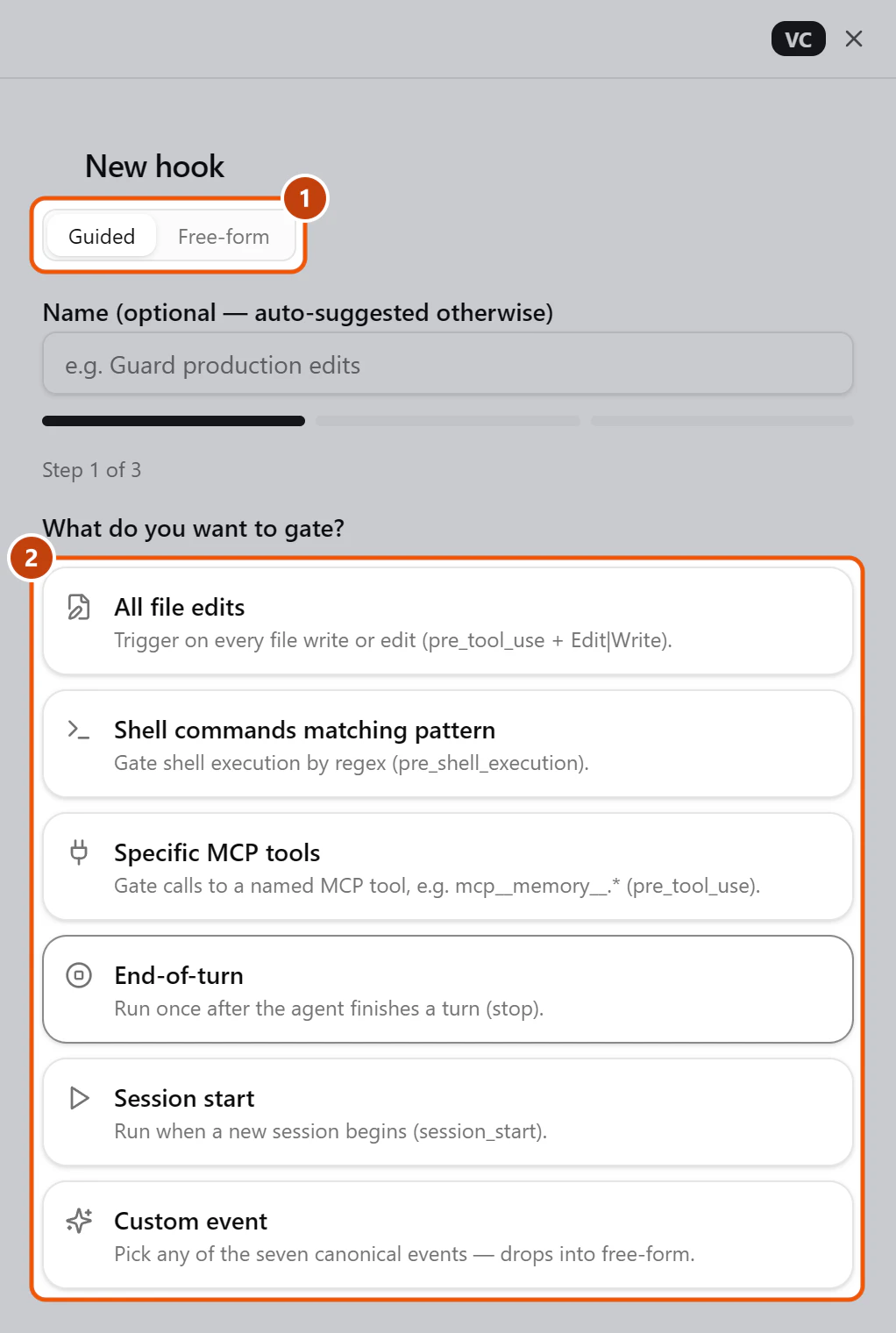
- Select Add hook. The New hook panel opens in Guided mode.
- Optionally type a name. If you leave it empty, Vibeless suggests one.
- Step 1, What do you want to gate? Pick All file edits, Shell commands matching pattern, Specific MCP tools, End-of-turn, Session start, or Custom event. The shell and MCP choices ask for a pattern. Custom event switches to the free-form form.
- Step 2, What action should it run? Pick Run a script and give an absolute path, or Run a shell command and type a one-line command. For session start, an Inject context from Vibeless option also appears. You do not need it: the system hooks already inject Vibeless context.
- Step 3, How strict? Pick a Drift threshold (Low, Medium, or High) and a Fail mode (Open or Closed).
- Select Create hook.
 (opens full size in a new tab)
Drift threshold and fail mode are saved with the hook and shown as badges in the list. The agent's configuration receives the event, the tool filter, and the command. Whether a hook can stop the agent depends on your command and on that agent's own hook rules.
Create or edit a hook in free-form
Select Free-form in the New hook panel, or select the edit button on an existing hook. Editing always opens free-form. The form has Name, Trigger event, Action, Tool filter, Priority, Drift threshold, and Fail mode.
Install hooks into agents
Saving a hook stores it in Vibeless. It does not reach any agent until you install it.
- Select Install hooks to .claude on the Hooks card. The button is disabled until the project has at least one hook.
- In the Install Vibeless hooks dialog, pick an agent tab. The tab shows the file it will write to and any conflict warnings.
- Turn Install Vibeless context-injection hook on to install it for that agent, or off to remove it.
- Under User hooks, turn each of your hooks on or off for that agent. Each change rewrites the agent's configuration right away.
- Select Show raw config to see and copy the merged file.
Stale path banner
A yellow banner reading Vibeless binary path is stale for N agents means a hook you installed from the Install Vibeless hooks dialog points at a file that no longer exists. A moved script or an older Vibeless install are the usual causes. The app checks Claude Code, Cursor, and Gemini configuration files each time you open the project.
Select Open install dialog and reinstall the hooks for the affected agent. If the hook runs your own script, edit the hook so its path is correct first. Dismissing the banner hides it until the next time you open the project.
Reports
The Reports card has 2 parts. The first is one setting, Ask agents for a scope attestation on review. It is on by default for new projects.
The second is the Jev check section. Jev is the paid-plan check of ticket receipts, which uses credits (see Logs). The section has one switch, OS notifications, which shows a system notification when Jev flags scope drift or when a risk action happens outside the ticket. The section reads "How Jev weighs the evidence and when it alerts is set by Vibeless." On the free plan it adds "Jev checks are part of paid plans." Both settings stay on this computer.
When it is on and an agent moves a ticket to Review, Vibeless asks the agent to file a scope attestation with vibeless_attach_report: every file it created, edited, renamed, or deleted for the ticket (up to 200), anything it did outside the ticket's spec (up to 50 lines), evidence for each acceptance criterion (up to 50), and optional notes. Vibeless compares the attestation with the receipt it builds from the recorded work. Files the agent touched but did not list are shown for your review, and files only the agent's word accounts for are marked as attested by the agent.
A full semi-formal certificate is still accepted. It has Definitions, Premises, Analysis, optional Edge Cases, Counterexample, and Formal Conclusion sections, plus a YES, NO, or PARTIAL answer. With an attestation, the certificate is optional.
Attestations and certificates appear in the Reports tab of the ticket's detail panel. Writing them uses the agent's own tokens; Vibeless spends no credits. Receipts are built whether or not the agent complies.
Agent-artifact paths
Agents leave scaffolding in a repository: plans, ticket notes, reports, settings, and whole git worktrees. The Agent-artifact paths card keeps that out of the change records that ticket receipts read. The scanner, file watcher, git monitor, and manual sync all skip these paths.
The list has 3 parts:
| Part | What it holds | Editable |
|---|---|---|
| Built-ins | Known agent folders such as .claude/tasks/, .claude/reports/, .codex/, docs/superpowers/plans/, and .worktrees/ | No (lock icon) |
| Detected worktrees | Linked git worktrees found in the repository, checked again each time the card loads | No (Detected worktree badge) |
| Extras | Paths you add | Yes |
To add a path, type it, select Add, then select Save.
Rules for extras:
- Paths are relative to the repository root, with no leading
/and no..segment. - Each path can be at most 512 characters, and you can add at most 200.
- A path matches itself and everything under it, on folder boundaries.
notesandnotes/both matchnotes/a.md, but notnotes.mdorsrc/notes/. - A path containing
*is a glob. - A leading
./is removed. - Entries that would ignore every file, such as
*,**, or*.*, are rejected. - Matching ignores case.
.claude/CLAUDE.mdis always kept.
Saving deletes recorded changes. When you save a changed list, Vibeless deletes the recorded changes that fall under it and reports how many it purged.
Purge ignored paths runs the same deletion against the current list. Use it after a new worktree appears, because worktrees outside .worktrees/ are filtered from live changes but not from a manual sync. The confirm dialog shows how many changes will go, and purging is disabled when the count is 0. A purge cannot be undone.
Nothing on this card adds anything to the spec map. People maintain the map in the app.
The session digest
At the start of each Claude Code or Codex session, the session start hook injects a digest of the project. OpenCode reads the same digest from its instructions file, and GitHub Copilot, Antigravity, and Gemini CLI receive it from a session start hook. Cursor gets no digest. It contains, in order:
- The project name and a line naming the MCP tools that hold the full detail.
- A staleness warning, only when the spec map is stale. The map counts as stale when it is 7 days old or more, or when it is empty.
- The project goal.
- The tech stack.
- Constraints, the rules about what must not be touched.
- Related projects, only when the project lists any: each one's name, folder, and Vibeless project id. See Related projects.
- The architecture overview, cut at 1,500 characters with a pointer to the full document.
- Key decisions. A decision is a recorded choice and the reasoning behind it. Decisions that forbid something come first, then the newest. When space runs short, older decisions shrink to one line each and then to a count, with a pointer to the tool that lists them all.
- A closing paragraph on how to work with Vibeless, including the commit line that attributes a commit to a ticket.
The digest is capped at 8,192 characters so the agent receives it in full. The goal, constraints, and related projects are never shortened. The tech stack shows at most 12 lines, then a count of the rest. The active ticket is not included; agents fetch it through MCP.
Vibeless rebuilds the digest after every governance change (a new decision, for example), when you add or remove a related project, right after an install, and when the app starts. A session that is already running keeps the digest it started with.
How it connects to the rest of Vibeless
Installing an agent here clears the Agent not connected banner on the Dashboard Overview.
The agent can also work on the projects listed under Related projects on the Dashboard's Settings tab, through the tools' project argument. See Related projects.
The recorders feed ticket receipts, which appear on each ticket's Reports tab and, when they need your answer, in Logs.
Rules and limits
Agents connected through MCP can:
- Read specs, decisions, constraints, phases, and tickets.
- Create tickets and change a ticket's status.
- Log decisions, attach scope attestations and reports, explain a receipt's unexplained files with
vibeless_justify_receipt, and bind their session to a ticket. - Do the same reads and ticket changes on a related project you listed, but never bind their session to its tickets.
Agents cannot:
- Edit a ticket's text or change a phase.
- Write constraints, non-goals, a decision's forbids list, or path globs on an existing project.
- Add anything to the spec map.
- Create a project, or add or remove a related project.
- Answer a receipt's flagged files, install or uninstall an agent, change hooks, or change the Reports settings. These need the app window.
People make those changes in the app.
If something looks wrong
| What you see | What it means | What to do |
|---|---|---|
The agent cannot reach the Vibeless MCP server, or tools return vibeless_app_unavailable | The app is not running, or the manifest is missing or unreadable | Open Vibeless, then reconnect the MCP server in the agent |
401 invalid_project_token | The token in the agent's configuration no longer matches the project, usually after a rotation | Select Reinstall on the agent's row |
401 with manifest_stale | Another process overwrote the manifest | Wait about 15 seconds and retry; the app repairs the file. If it persists, close any second Vibeless instance or restart the app |
| Tool calls time out | The app is running but not responding | Check the app log. Logs roll daily as vibeless.log.<date> and are kept for 30 days, in %LOCALAPPDATA%\vibeless\logs on Windows or ~/Library/Application Support/vibeless/logs on macOS. Export diagnostic logs on the Dashboard's Settings tab saves a copy |
| Install is disabled | The agent was not detected | Run the agent once in the project so it creates its folder |
| The OpenCode install is refused | The project has an .opencode/opencode.jsonc file | Rename it to opencode.json, then select Install again |
| The GitHub Copilot install is refused | Git tracks .mcp.json, or the file is not valid JSON | Follow the message on the row: untrack the file with git rm --cached .mcp.json, or fix the JSON. Then select Install again |
| GitHub Copilot shows no Vibeless tools and nothing is recorded | The folder is not trusted in Copilot | Trust the folder in Copilot, then start a new session |
| GitHub Copilot has the Vibeless tools but nothing is recorded | The hooks are not running: Node is not on your PATH, or you use a Copilot surface where recording is not verified | Check that node runs in a terminal, then start a new session |
| GitHub Copilot refuses to install in a subfolder | The project is a folder inside a git repository. Copilot CLI loads hooks from the repository root, so the recorders would never run. Nothing was written | Open the repository root as a Vibeless project and install GitHub Copilot there |
The GitHub Copilot row shows an issue about .github/hooks/vibeless.json | Vibeless connected the tools but did not write its recorders, because a file of that name is yours or you added something to it | Move your hooks to another file in .github/hooks, then select Retry on the row |
| Disconnect was refused: the row says the agent "was not disconnected and nothing was changed" | Vibeless could not cleanly remove its entry or its recorders. For Claude Code, Codex, Cursor, and OpenCode, the hooks file is not valid JSON or OpenCode's plugin file cannot be deleted. For GitHub Copilot, Antigravity, and Gemini CLI, a hooks file holds something you added next to the recorders, a file is not strict JSON and still names the Vibeless entry, a key is repeated, or a file cannot be written | Follow the message on the row, then select Retry beside it. See When an uninstall is refused |
| The row says a file was left: "Vibeless disconnected ... but left ... as it is" | The uninstall went through, but Vibeless could not read the configuration file (Antigravity, Gemini CLI). It may still hold the Vibeless address and access token. This is remembered only until the app restarts | Follow the message on the row, then select Retry. To connect the agent again, select Install. See When an uninstall leaves a file |
The Claude Code and GitHub Copilot rows both say .mcp.json still holds the Vibeless server entry | The Vibeless marker in .mcp.json lists no agent Vibeless knows | Select Retry on either row. It removes the entry and the marker |
Gemini CLI: slash command ignored in gemini -p | In a headless run Gemini CLI puts the session digest in front of the prompt, so the slash command is sent to the model as plain text (read from the Gemini CLI source, not tested) | Run the slash command in an interactive Gemini CLI session |
| The Antigravity install is refused | Git tracks .agents/mcp_config.json, the file contains comments, or it already has a vibeless server that Vibeless did not write | Follow the message on the row: untrack the file with git rm --cached .agents/mcp_config.json, remove the comments, or remove or rename the server. Then select Install again |
| Antigravity is connected but nothing is recorded | The hooks are not running: Node is not on your PATH, the workspace is not trusted, or you use an Antigravity surface where recording is not verified | Check that node runs in a terminal, trust the workspace in Antigravity, then start a new conversation |
The Antigravity row shows an issue about .agents/hooks.json | Vibeless connected the tools but could not write its recorders, for example because the file contains comments or its vibeless hook holds a handler you added. Recorders from an earlier install stay in the file and keep running | Select Retry on the row; the message that follows says what to fix |
| The Gemini CLI install is refused | Git tracks .gemini/settings.json, the file contains comments, or it already has a vibeless server that Vibeless did not write | Follow the message on the row: untrack the file with git rm --cached .gemini/settings.json, remove the comments, or remove or rename the server. Then select Install again |
| Gemini CLI shows no Vibeless tools and nothing is recorded | The folder is not trusted in Gemini CLI | Trust the folder in Gemini CLI, then start a new session |
The Gemini CLI row shows an issue about hooks | The hooks section of .gemini/settings.json is malformed, so Vibeless connected the tools but added none of its hooks | Fix hooks in the file, then select Reinstall on the row |
A ticket receipt's Sources line reads hook touches 0 | The recorder hooks are missing from the agent's configuration, usually because the app could not rewrite the file when it started | Select Reinstall on the agent's row, then Build receipt on the ticket |
| The system hooks vanished after you installed your own hooks | Installing from the Install Vibeless hooks dialog rewrites the agent's Vibeless entries and can drop the system hooks until the app next starts | Select Reinstall on the agent's row |